Qelvanto
Anchor Map
Anchor Map
Couldn't load pickup availability
-
Problem Statement
After learners study functions, arrays, strings, and code layout, C++ introduces a new way to organize ideas through classes and objects. At this stage, learners may feel that the code is no longer only a sequence of statements, because data and behavior can now belong together inside one named structure. Class syntax can also feel unusual at first, with public sections, member names, object creation, dot notation, and function calls that belong to a specific object. Some learners can read a standalone function, yet feel uncertain when a function becomes part of a class. Anchor Map was created for learners who want a structured written path through object-based C++ concepts with examples, review pages, and guided practice. -
Solution
Anchor Map introduces object-based C++ through organized modules that begin with the reason classes exist and then move into syntax, objects, members, constructors, and small class examples. The course uses short code samples and detailed notes to show how related values and functions can be grouped under one name. Learners are guided to read a class from top to bottom, identify data members, identify member functions, and follow how an object uses those parts. Practice tasks ask learners to label class sections, trace object values, compare examples, and explain what each member does. The course keeps the study path steady by connecting class ideas with earlier topics such as variables, functions, strings, arrays, and conditions. -
What’s Inside
Anchor Map begins with an orientation page that explains object-based thinking in plain language. The course describes a class as a written plan for grouping related information and actions. An object is then introduced as a usable item created from that class plan. This opening section avoids heavy theory and focuses on readable comparisons, such as storing a name and a value together, then placing related behavior beside them.
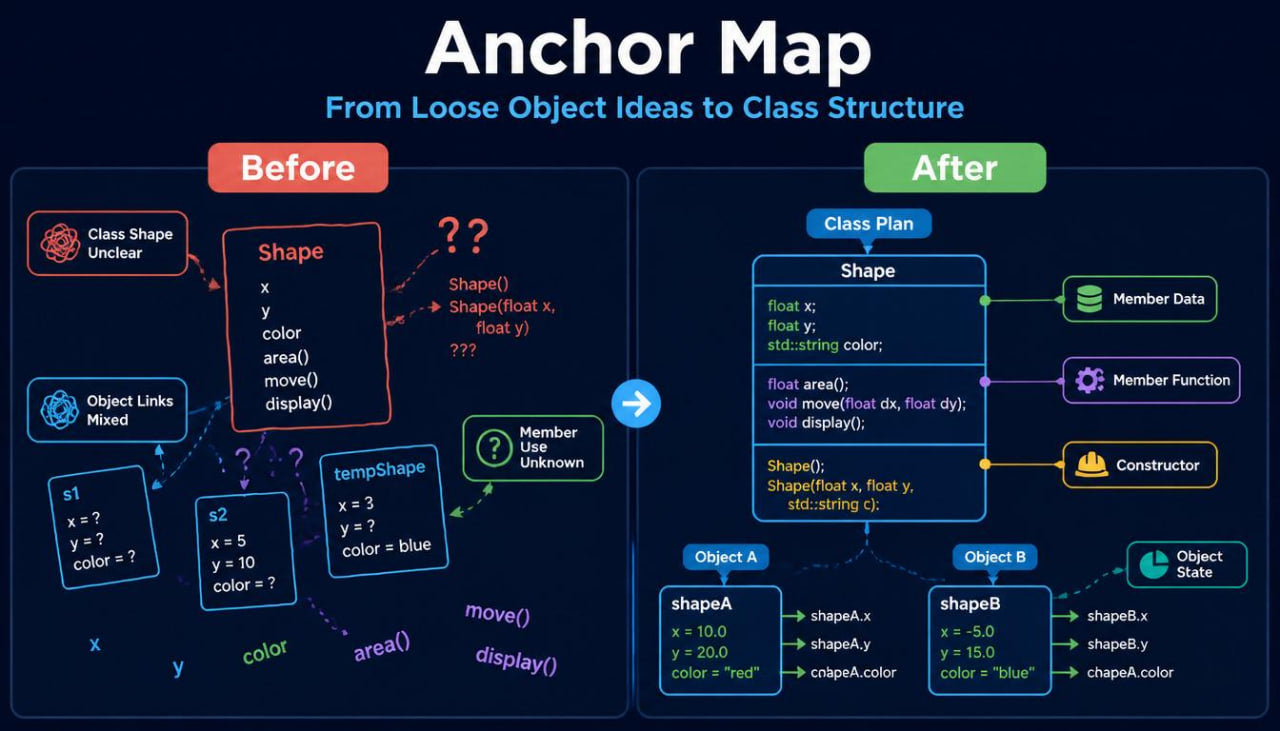
The first module introduces class shape. Learners review a short class declaration with a class name, braces, a public section, member variables, and member functions. Each part is explained in a focused note. The course shows where the class begins, where it ends, why the semicolon after the closing brace matters, and how member names are placed inside the class body. Practice prompts ask learners to mark the class name, circle the member data, and describe the role of each line.
The second module explains objects. Learners study how an object is created from a class and how the object name is used in code. The material shows compact examples where two objects come from the same class but hold different values. This helps learners understand that the class describes the structure, while each object can carry its own data. Written tasks ask learners to compare two objects, identify their values, and explain how they are related to the same class.
A dedicated section focuses on dot notation. Learners review how the dot connects an object name with a member inside that object. The course gives examples of assigning values to members, reading values from members, and calling member functions. The notes explain how to read from left to right: object name first, dot second, selected member third. Practice pages include small code lines where learners identify which object is being used and which member is being selected.
Anchor Map then introduces member functions. This section connects earlier function study with class-based organization. Learners see how a function can belong inside a class and work with the data stored in an object. Examples include setting values, printing a short summary, checking a condition, and returning a value. The course explains the difference between a standalone function and a member function without making the wording heavy. Learners complete tasks where they label the member function name, identify values used inside it, and trace the result of calling it through an object.
The course also includes a module on public and private sections. This topic is introduced carefully because it can feel abstract for learners who are seeing class design for the first time. The materials explain that some class parts can be used directly from outside the object, while other parts are kept inside the class and used through member functions. The course avoids exaggerated language and focuses on reading examples. Learners compare two versions of a class and answer questions about which lines can be used from outside and which lines are kept inside the class body.
A constructor section follows. Learners study constructors as special class functions used when an object is created. The course explains naming, parameter use, initial values, and how a constructor can help place starting data into an object. Examples begin with a no-parameter constructor, then move to constructors with parameters. Practice tasks ask learners to match constructor calls with the values that enter the object.
Another module explains setters and getters in a practical way. Learners read examples where member functions place values into private data members and return values for review. The section shows how parameters, return values, and object state connect. Written prompts ask learners to identify the setter parameter, the private member being changed, and the getter return line.
Anchor Map includes a small class-reading workbook. This workbook gives learners short class examples and asks them to label class parts, trace object creation, follow member function calls, and explain final values. Some exercises include missing semicolons, unclear member names, or mixed object references. Learners are guided to correct the line and write a short reason for the correction.
A combined section connects classes with arrays and strings. Learners see examples where an object stores text-like data, number values, or a small group of related information. The course shows how object-based organization can keep related data under one named structure. Examples remain compact so learners can focus on the relationship between the class, the object, and the member functions.
Anchor Map also includes recap notes after each major module. These recap pages collect key terms, short code fragments, and written review prompts. A glossary explains class, object, member data, member function, public, private, constructor, parameter, setter, getter, dot notation, and object state. Each term is paired with a compact C++ reference.
The final review set brings the course together through a small class example. Learners read the class, identify the constructor, follow object creation, trace member function calls, and explain how the object data changes through the code. This final review connects object-based concepts with earlier Qelvanto topics such as variables, functions, conditions, and strings.
-
Who Is This For?
Anchor Map is for learners who already understand functions, parameters, return values, arrays, strings, and basic code organization. It is intended for learners who are ready to study classes and objects in a written format with careful examples.
This tier may fit learners who have seen class syntax before but still find object-based code difficult to follow. The course gives a steady reading path through class shape, object creation, dot notation, constructors, and member functions. It is also useful for learners who want to prepare for wider object-based C++ topics later.
Anchor Map is suitable for people who prefer organized written materials, annotated code examples, practice tasks, and recap pages. The course does not rely on large projects or dramatic claims. It focuses on helping learners read class-based C++ code with greater structure and attention.
- What You’ll Learn
- How a C++ class is written and read
- How objects are created from a class
- How member data belongs to an object
- How member functions are placed inside a class
- How dot notation connects an object with its members
- How public and private sections appear in class examples
- How constructors place starting values into objects
- How setters and getters work with private data
- How parameters and return values appear inside member functions
- How to trace object values through several statements
- How to compare two objects created from the same class
- How to review class-based code with written notes
-
Refund Note
Anchor Map is a paid Qelvanto tier. Eligible course purchases may be reviewed within a 30-day refund window according to the refund terms shown on the store page.
Self-paced learning overview
- 📘 Digital file available after purchase
- 🗂️ Long-term availability
- 🔐 Secure checkout
- 🗓️ Content updated in 2026
What format are Qelvanto courses provided in?
What format are Qelvanto courses provided in?
Qelvanto courses are provided as digital written materials with organized modules, examples, practice tasks, recap sections, and review notes. The focus is on reading, code observation, written exercises, and steady topic review.
Do I need previous C++ knowledge before starting?
Do I need previous C++ knowledge before starting?
Some Qelvanto tiers begin with beginner-friendly explanations, while wider tiers include more detailed C++ topics. Each course page explains the intended study stage, so learners can choose materials that match their current background.
Can I study at my own pace?
Can I study at my own pace?
Yes. The materials are arranged in sections, so learners can read, pause, return to earlier pages, and repeat practice tasks when needed.
Share